


Contacts: Call Log & Dialer
4.317.00 Reviews
App Specs
- Version
- 1.6
- Updated On
- License
- Free
- Downloads
- 50,000+
- Developer
- HD Camera Developer
- Categories
- Communication
- Platform
- Android
Screenshots
 Analysis by AppCompare
When I first opened Contacts: Call Log & Dialer, I treated it as a practical replacement for the scattered contact and phone tools that many Android users already have. Its purpose is straightforward: keep contacts easier to reach, show recent call activity, and make the act of starting a call feel less like a search task. That simplicity is its main appeal. I would not choose it for entertainment or deep customization; I would choose it when I want a focused communication tool that helps me get from a name to a phone call quickly.
The app comes from HD Camera Developer and sits in the communication category. It is free, rated for Everyone, and works with Android 8.0 or later. The current release is version 1.6, while its public reception stands at a 4.3 average from roughly four hundred ratings. It has passed the fifty-thousand-install mark, which gives it a useful level of adoption without making it feel like an unavoidable, overloaded platform.
Getting from installation to a useful first call
I’d start by testing the app with one familiar contact rather than changing my whole calling routine at once. That gives me a simple way to judge whether its contact view feels clear and whether reaching the call action is straightforward. Once that path feels comfortable, I can see how recent activity fits into the workflow that follows.
What to expect when you open it
The best way to understand this app is as a compact front door for everyday phone activity. Instead of opening a contacts app to find someone, a separate call-history screen to check a recent conversation, and the phone interface to dial, I can use one communication-focused place. That does not automatically make every part of calling better, but it can reduce the small pauses that build up when I am trying to reach someone in a hurry.
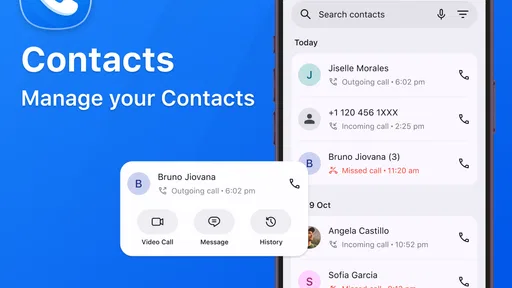
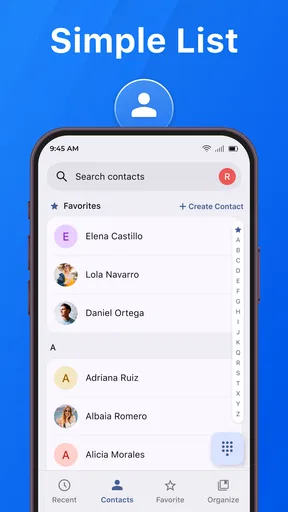
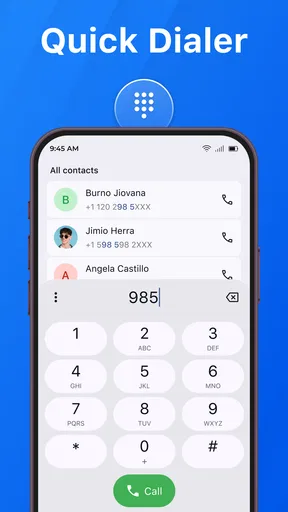
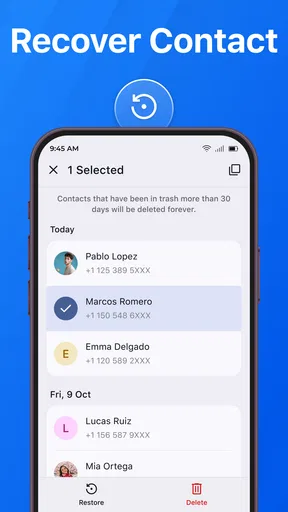
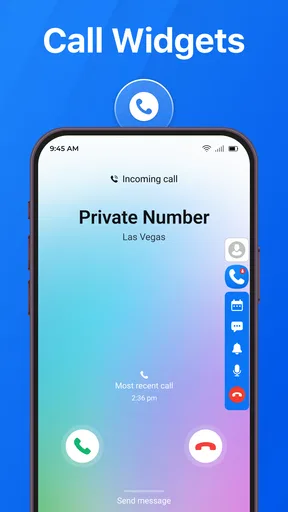
My first expectation would be a clean, functional experience rather than a replacement for every phone feature. The store summary points to three jobs: organizing contacts, viewing call history, and making calls quickly. Those jobs are closely related, and the app makes more sense when I use them as one workflow. I look up a person, check whether I recently called them, and then decide whether to call again. That is more useful than treating the screens as unrelated utilities.
For a first-time user, the important mental shift is not to expect a social communication service. This is a phone-management app, not a messaging network or an internet calling platform. Its value depends on how well it helps me handle the contacts and call activity already associated with my device. Someone who wants video chats, group conversations, or a large messaging ecosystem should stay with a dedicated service for those needs.
I also appreciate that the app is free to start using. That removes the most immediate barrier for someone who simply wants to test a different way to access contacts and calls. The Everyone age rating makes it suitable for a broad household audience, although any communication app still deserves sensible care when it displays personal names and phone activity on a shared device.
Worth Reading Before You Choose

EA SPORTS FC Mobile 26 Is a Bigger Football Game, but It Takes Time

Flipboard Shows What News Apps Must Do Beyond the Feed

Switching to Android Auto Means Rethinking Your Driving Routine

Google Calendar Makes a Crowded Week Easier to Manage

Ludo King Makes the Most of the Minutes Between Plans

Baby Panda World Brings Quick Play to Modern Phones, but Its Game Library Feels Busy
Setting it up without overthinking the process
After installing it, I would begin with the smallest possible setup: open the app, look for the contacts area, and identify whether the people I regularly call are visible there. A first launch can feel confusing if I immediately try to inspect every screen. Starting with one familiar contact gives me a concrete test and makes it easier to notice what the app is actually changing in my routine.
The app needs access to the phone-related information that makes its central tasks possible, so I would read each system prompt rather than tapping through automatically. If Android asks for access connected with contacts or call activity, I would consider whether that permission matches the feature I am trying to use. If I deny something, a related screen may not be useful until I revisit the system settings. That is not a reason to avoid the app; it is simply a reminder that communication tools work best when their access is granted deliberately.
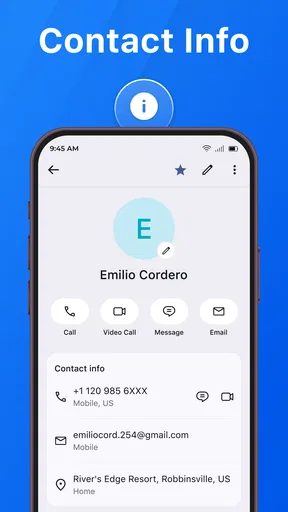
A good setup habit is to verify one contact before making any changes elsewhere. I would search for a close friend or family member whose details I already know, open the entry, and compare the displayed name with the phone number I expect. This catches problems such as duplicate entries or a contact saved under an unexpected label before I rely on the app during a rushed call.
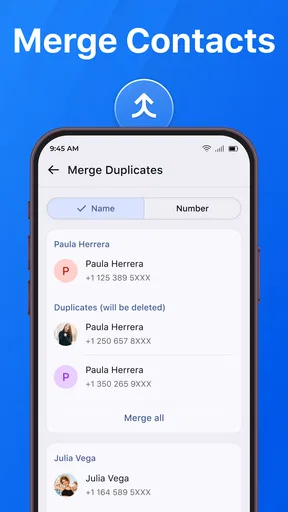
Organization is where I see a less obvious benefit. Rather than trying to clean an entire address book in one session, I would use the app to identify the contacts I actually reach. If a person appears more than once, or if an old number is mixed with a current one, the call screen becomes a prompt to tidy that record later. This is a more realistic workflow than attempting a major contact cleanup when I only need to place one call.
I would also keep expectations realistic about synchronization. The app is useful as an interface for contacts and call history, but I would not assume that changing the way I view a contact automatically solves every duplicate, backup, or account-management issue on the phone. For those tasks, the phone’s account settings or a dedicated contacts-management tool may still be the better place to work.
The first successful action
The quickest meaningful test is simple: find one known contact and start a call. I would choose someone I can safely reach, open their record, and use the calling action rather than manually typing the number. If that works smoothly, the app has already proved its central purpose to me. The test is more useful than browsing menus because it measures the exact moment when the app either saves time or creates another step.
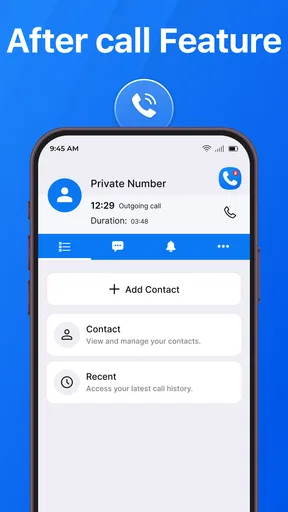
Call history adds a second practical test. After the call, I would return to the recent activity view and check whether the interaction is easy to recognize. When I need to call the same person again, a visible recent entry can be faster than searching the whole address book. This is especially helpful for short-lived tasks such as confirming an appointment, returning a missed call, or checking on a delivery.
One of my favorite realistic uses is handling a busy morning. Imagine that I am leaving home and realize I need to call a repair service I contacted recently. I may not remember the company’s exact contact name, but I know it was one of my latest calls. I can use the recent activity view to locate that conversation, confirm that I have the right entry, and call without reconstructing the search from memory. That is a small convenience, but it is exactly the kind of repeated friction a focused dialer can remove.
Another useful scenario involves family contacts. If several relatives have similar names, searching only by memory can lead to hesitation. Looking at the contact record and recent activity together gives me another way to distinguish the right person. I still check carefully before calling, but the combined context is more reassuring than a bare number on a keypad.
For users who dial unfamiliar numbers, the app’s quick-calling role may be less dramatic. Manually entering a number can still be the most direct route, especially when the number is printed on a letter or displayed on another device. In that situation, the app is not necessarily faster than the standard phone interface. Its stronger case is repeated contact access, not replacing every possible dialing method.
Where first-time users may get confused
The biggest source of confusion is likely the difference between viewing information and changing the underlying contact. A contact organizer can make names and numbers easier to reach, but I would not assume that every adjustment made inside the app has the same effect as editing a contact through the phone’s main people app. If I need an important correction to persist across the device, I would verify the result afterward rather than trusting the screen alone.
Call history can also be misunderstood. A recent-call list is a record of activity, not a complete explanation of every conversation. I would use it to identify a person or return a call, but I would not treat it as a substitute for notes, reminders, or a full communication log. For work that requires detailed follow-up, I would record the relevant information in a separate place instead of expecting the dialer to remember the context.
Duplicate contacts are another area where patience helps. If the same person appears under two entries, the app may make both easier to find, but that does not automatically mean the address book has been merged. Before calling, I would compare the numbers and choose the record I know is current. Later, I would clean up the duplicate through whichever contact-management system controls my phone.
There is also a practical privacy consideration. A screen showing names and call activity can reveal more than a user expects if someone else can see the device. I would avoid leaving the app open in a public place and would use the phone’s existing security settings. This is not a special criticism of the app; it is a normal consideration for any tool that puts personal communication details in one accessible view.
The app may not be the right choice for people who want a highly specialized dialer. If my priority were extensive blocking controls, business contact fields, cloud-based team sharing, or a full messaging replacement, I would compare dedicated alternatives before switching. The standard phone app may also remain preferable if it already offers a familiar, well-integrated experience and I rarely struggle to find contacts.
How it compares with the usual phone tools
Compared with the default Android phone and contacts apps, this app’s attraction is concentration. It puts the contact list, call history, and calling action into a communication-centered experience. That can feel more direct for someone who regularly moves between those three tasks. The trade-off is that the default tools are usually the most deeply connected to the phone’s system behavior, so users who value native integration may notice fewer reasons to change.
Compared with a messaging app, the difference is even clearer. Messaging services are built around conversations, delivery states, media, and sometimes internet-based calls. This app is better suited to the moment when I already know I need a phone call and want to reach the right saved number quickly. I would use both types of apps rather than expecting one to replace the other.
Compared with a standalone contacts manager, Contacts: Call Log & Dialer has a more immediate relationship with call activity. A contacts manager may be stronger for editing, grouping, or maintaining a large address book, while this app is more compelling when the next action is calling. That distinction matters for people with extensive professional directories. A sales worker or administrator may need richer record management than this focused tool is intended to provide.
The most useful trade-off is therefore convenience versus depth. I gain a straightforward route to recent calls and familiar contacts, but I should not confuse a streamlined calling surface with a full personal-information manager. For my own routine, that is a reasonable exchange when I want fewer steps and do not need elaborate contact administration.
Small workflows that make the app more useful
I found that the app makes more sense when I build habits around situations rather than around its menus. Before returning a missed call, I check the contact name and the recent activity together. Before calling a business, I confirm that the number belongs to the current entry. Before saving another number, I search first to avoid creating a duplicate. These are simple actions, but they turn the app from a passive list into a safer calling routine.
A second tip is to use call history as a short-term memory aid, not as a permanent filing system. If I need to call someone again later in the day, recent activity is convenient. If the task matters next week, I would create a reminder elsewhere. This prevents an easy-to-find recent call from giving me false confidence that I have actually recorded the follow-up.
A third insight is that contact quality matters more than interface speed. If names are inconsistent, numbers are outdated, or several records belong to the same person, even a quick dialer can only take me quickly to the wrong place. I would periodically correct the few contacts I use most, rather than spending time on the entire address book. That targeted maintenance gives the app a much better chance of feeling reliable.
For older relatives or less technical users, I would introduce the app through one repeatable action: open it, find a saved person, and call. I would avoid explaining every option at once. Once that path feels familiar, call history can be added as a second lesson for returning calls. The app’s focused purpose makes this gradual introduction more approachable than teaching a user a large communication platform with many unrelated screens.
Who should install it and who should skip it
I would recommend it to Android users who frequently search for saved contacts, return recent calls, or feel that their current phone tools scatter these tasks across too many places. It is also a sensible trial for someone who wants a free, uncomplicated communication utility and prefers to judge it through everyday calling rather than extensive configuration.
I would be more cautious if I depended on advanced contact administration. People managing a large business directory, shared customer records, or detailed follow-up histories may be better served by a dedicated contacts or customer-management solution. Likewise, users who mainly communicate through messaging or video calls may gain little from changing their dialer.
I would also skip it if the phone’s built-in contacts and call screens already feel fast, clear, and dependable. Installing another interface is worthwhile only when it solves a real annoyance. The app should earn its place through a smoother first call, a clearer return-call workflow, or easier contact organization—not simply because it is available.
My final take after using its core workflow
Contacts: Call Log & Dialer succeeds by staying close to a practical need: finding people and calling them with less hesitation. Its strongest experience comes from combining a contact entry with recent call context, especially when I am returning a call or trying to distinguish between similar names. The free price and broad age rating make it easy to try, while support for Android 8.0 and later covers a wide range of devices.
Its limitations are tied to that same focus. I would not expect it to replace a full contacts-management system, a messaging service, or a detailed follow-up tool. I would also take care when granting phone-related access and when editing important contact information. Those are manageable considerations, but they matter if reliability and privacy are central to my routine.
My recommended path is to install it, test one known contact, make one safe call, and then use the recent-call view for a return call. If those two actions feel more natural than the phone’s usual workflow, the app has a clear place on the device. If they do not, the default tools may already be the better choice. For me, it is a useful, focused communication app—not a dramatic overhaul, but a practical way to make everyday calling more organized.
Pros
- Quick access to contacts
- recent calls
- and the dial pad
- Search makes finding people and numbers fast
- Clean layout is easy to understand for new users
- Useful call history details help track previous conversations
- Can simplify calling compared with some default phone apps
Cons
- Requires sensitive permissions for contacts and call history
- Some features may depend on the device or Android version
- Ads or premium prompts may affect the calling experience
- Limited customization compared with advanced dialer apps
- Privacy-conscious users may prefer the phone’s built-in dialer
FAQs for Contacts: Call Log & Dialer
What is Contacts: Call Log & Dialer, and what can I use it for?
Contacts: Call Log & Dialer is a communication app designed to bring your contacts, recent calls, and phone keypad together in one place. It can make it easier to search for saved numbers, review incoming and outgoing calls, and start a call quickly. Depending on your device and Android version, some features may require setting the app as the default phone or dialer application.
Does Contacts: Call Log & Dialer need access to my contacts and call history?
Yes, the app generally needs permission to read your contacts so it can display names and numbers, and access to call logs to show recent incoming, outgoing, and missed calls. Calling features may also require phone permissions. These permissions involve sensitive personal information, so review the requested access carefully and disable anything you do not consider necessary through your device’s privacy settings.
Can I use it as my default phone or dialer app?
In many cases, Contacts: Call Log & Dialer can be selected as the default phone application, allowing it to handle calls and provide the main dialing interface. The exact option depends on your phone manufacturer, Android version, and the app’s current compatibility. Before switching, check whether essential functions such as answering calls, caller identification, and emergency calling continue to work correctly.
Does the app identify unknown callers or block spam calls?
The availability of caller identification and spam-blocking tools may vary according to the version of Contacts: Call Log & Dialer, your region, and the permissions granted. Some versions may focus mainly on contact management and call history rather than offering a complete caller-ID database. If these features are important to you, confirm their availability in the app description and settings before downloading.
Is Contacts: Call Log & Dialer free, and are there any privacy or advertising concerns?
The app may be available to download at no initial cost, but free versions can include advertisements, optional purchases, or limitations on certain tools. Because a dialer handles contacts and call-related information, privacy should be considered carefully. Read the store’s data-safety section, review the developer’s privacy policy, and avoid granting permissions unrelated to calling or contact management.


